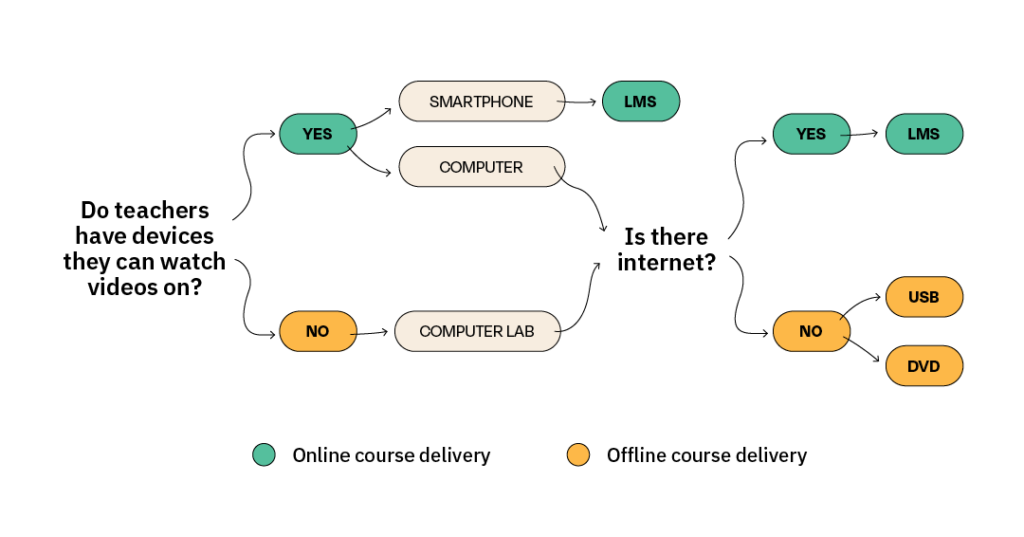
Considerations for accessible online learning are multi-facetted. One core aspect is learners’ accessibility to devices and bandwidth for watching instructional videos. The Aga Khan Foundation uses a simple “decision-making tree” for assessing participants’ accessibility to appropriate technology which influences how video-based learning content is disseminated.
Not captured in the “tree”, but of importance is how the accessibility to different types of devices influences content creation. For example, data from the Aga Khan Foundation’s Learning Hub demonstrates that learners with mobile devices spend on average 5.5 minutes engaged in learning compared to those with desktops and tablets who spend over 16 and 45 minutes respectively. Producers of learning content can use such data to make decisions around dissemination strategies as well as length of learning content.
SAGE is funded through the Foreign, Commonwealth and Development Office’s (FCDO) Girls’ Education Challenge initiative. It is a non-formal education programme in Zimbabwe, delivered through a consortium, led by Plan International in partnership with the Ministry of Primary and Secondary Education (MoPSE). Its aim is to help the most educationally marginalised acquire foundational literacy and numeracy skills. SAGE seeks to promote and improve education for girls by tackling the root causes of gendered social and economic barriers, creating an enabling environment for transforming gender norms.
SAGE organises its Community Educators into local learning hubs across 11 districts. Hub-based staff are supported by formal schoolteachers who provide ongoing mentoring and CPD. Prior to the pandemic, the CPD model included face-to-face workshops only.
Covid-19 restrictions led to educational closures. The move to WhatsApp training was a realistic pivot due to reliable mobile phone connectivity. WhatsApp enabled the technical team to continue with CPD as Community Educators adapted to facilitating distance learning and to training new volunteers. The use of WhatsApp allowed for continuous dialogue and increased opportunities for reflective practice.
Initially, WhatsApp training engaged educators through large group work. Feedback from facilitators and Community Educators shaped the approach to move to smaller groups to allow for more in-depth discussions.
The UK Open University (OU) was part of the SAGE technical team to virtually lead WhatsApp training sessions for facilitators. In some instances, CPD sessions for Community Educators were co-facilitated by the technical team to build confidence. All facilitators attended reflective sessions and gave feedback on the approach.
Training materials were succinct, accessible, and compatible with smartphone access. Two-hour WhatsApp workshops for facilitators posed key questions grounded in the case studies. Later, the model moved to smaller group training with sessions focussing on ‘Plan, Do, Feedback, Reflect,’ with staff from hubs across districts working as sustainable geographical communities of practice. As Covid-19 restrictions eased, the training model has become a blended CPD model retaining the benefits.
The participants of the Reading Through Play course, run by Right to Play (RtP), are primary- and secondary-grade teachers who are part of a project called Partners in Play (P3). This is a project in Ghana to improve the quality of education through a scalable learning-through-play model. One of the main activities is training teachers. A Continuum of Teacher Training approach is used where the training is developed from a child-centred learning lens.
We considered the teachers’ digital skills level when piloting the course. Therefore, we surveyed teachers in:
Digital Literacy • knowledge of a computer/laptop/mobile device • navigating the internet • using mobile apps
Access • how and when they use their mobile device • how they accessed Internet
Equipment specifications • type of mobile device they use • version of operating system on their mobile device • version of web browser on their mobile device • available data storage
Based on the responses, we conducted an in-person orientation and distributed a step-by-step guide on how to access the course. The workbook included short tutorials on how to interact with activities in each module. We also ensured the course was accessible on mobile devices and offline. The variation among teachers’ answers led us to incorporate a basic ICT training in the CPD.